

 Loading...
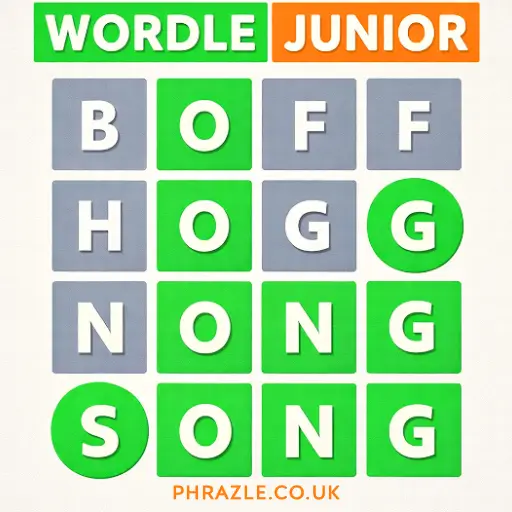














Play Wordle Junior online for free and dive into a world of fun word puzzles! This game is perfect for kids who love a challenge. With colorful graphics and easy-to-understand rules, it’s both exciting and educational. Guess the right words to win, and watch your vocabulary grow. No downloads needed, so you can enjoy it anytime, anywhere—even at school! Sharpen your mind and have a blast with friends or family. Ready to test your skills? Jump in and start guessing!
Is Wordle Junior Worth Playing? (Review)
Wordle Junior is a fun and educational game that both kids and adults can enjoy. Developed to be accessible for younger audiences, it offers a delightful twist on the classic Wordle game. Released to provide a junior-friendly experience, this version focuses on enhancing vocabulary while keeping the gameplay engaging.
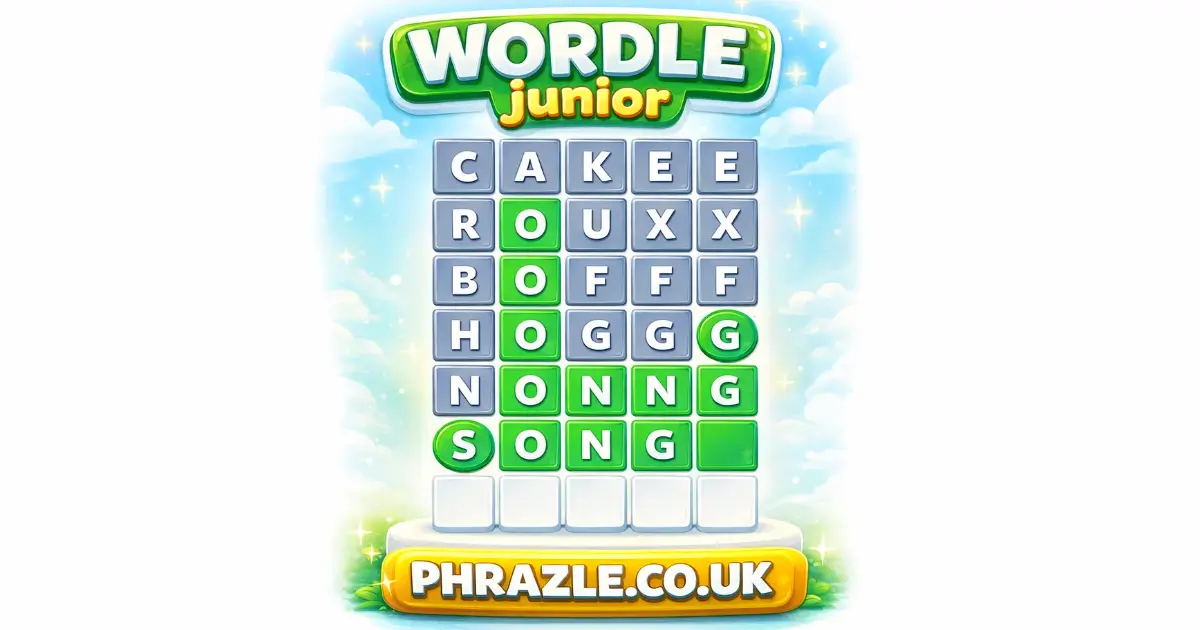
Players are tasked with guessing 4-letter words within 7 attempts. The game provides helpful clues by changing the color of the letters: green for correct letters in the right spot, yellow for correct letters in the wrong spot, and gray for incorrect letters. This feedback system helps players improve their word-guessing skills while having fun.
If you're looking for a game that combines strategy, logic, and word knowledge, this is a great choice. It encourages creativity and adaptability, making each round a new challenge. Plus, with new rounds appearing every 5 minutes, there's always another chance to improve your skills.
Whether you're a parent seeking an educational tool or a kid wanting an entertaining challenge, this game is definitely worth playing. It's free and requires no download, making it easily accessible at school or home.
Wordle Junior Controls & Physics Explained
In this game, you will guess a 4-letter word in 7 tries. Here's how it works:
- Type your guess using the keyboard and click "Submit".
- The game uses colors to give you clues:
- Green: The letter is correct and in the right place.
- Yellow: The letter is in the word but in the wrong spot.
- Gray: The letter is not in the word at all.
- If you're stuck, use the "Sneak a Peek" feature to reveal a letter in its correct position. You can use this help twice per round.
- A letter can appear more than once, so think carefully about your guesses.
The game encourages strategic thinking and boosts vocabulary skills. Each round presents a new challenge, keeping it fun and educational.
Play Wordle Junior Instantly in Browser
You can play this game directly in your web browser on desktop, laptop, tablet, or mobile.
Getting High Scores in Wordle Junior
Want to become a Wordle master? Follow these simple steps to boost your scores:
- Start Smart: Begin with a word that has lots of vowels. This helps you find the right letters quickly.
- Use Color Clues: Pay attention to the colors. Green means the letter is correct and in the right spot. Yellow means it's in the word but in the wrong spot. Gray means it's not in the word at all.
- Think Strategically: Use your guesses wisely. Try different combinations based on the color clues.
- Sneak a Peek: If you're stuck, use the "Sneak a Peek" feature to reveal a letter in its correct position. Remember, you can only use this twice per game.
- Practice Makes Perfect: Keep playing to improve your skills and learn new words.
Remember, practice and patience are key. Keep guessing and have fun!
How to Control in Wordle Junior
Mastering the controls is essential to excel in the game. Here's a guide to help you navigate:
- Type your first guess using the keyboard and click "Submit" to enter your word.
- Observe the color feedback after each submission:
- Green: Correct letter in the correct position.
- Yellow: Correct letter but in the wrong position.
- Gray: Incorrect letter.
- You have 7 attempts to guess the correct 4-letter word.
- Use the "Sneak a Peek" feature for hints, allowing you to see a letter's correct position up to two times per game.
Top 5 Secrets in Wordle Junior
Uncover the best ways to excel in this fun word game with these top secrets:
- Start with Vowels: Begin your guesses with words that have lots of vowels. This helps reveal more letters quickly.
- Sneak a Peek: Use the "Sneak a Peek" feature wisely. You get two chances to see a letter in its correct spot. Save them for when you're stuck.
- Color Clues: Pay close attention to the color changes. Green means the letter is correct and in the right place, yellow means it's in the word but wrong spot, and gray means it's not in the word at all.
- Repeat Letters: Remember that letters can appear more than once. Don't hesitate to guess words with repeated letters if you're unsure.
- Practice Makes Perfect: If you can't solve it on your first try, don't worry! Keep practicing different strategies and you'll improve over time.
What Makes Wordle Junior Special?
This game offers unique features that make it engaging and educational for players of all ages:
- Four-Letter Words: Players guess four-letter words, making it accessible for younger players.
- Seven Attempts: Each round gives you seven tries to guess the correct word, adding a fun challenge.
- Color-Coded Feedback: After each guess, colors indicate accuracy. Green means correct position, yellow indicates the letter is in the word but wrong position, and gray signifies the letter isn't in the word.
- Sneak a Peek: Use this feature to reveal a letter in its correct position. You can use it twice per game.
- Random Mystery Words: Each round presents seven random words, keeping gameplay fresh and exciting.
- Educational Value: Enhances vocabulary and logical thinking through strategic guessing and deduction.
- Quick Rounds: New rounds start every 5 minutes, ensuring continuous play without long waits.
Best Place to Play Wordle Junior
The best place to play this game is its browser-based version. This adaptation allows you to enjoy it seamlessly on Chrome, Firefox, Safari, and Edge. The online version offers a user-friendly experience with no download required, making it perfect for playing at school or on the go. Enjoy features like "Sneak a Peek" for hints, and a colorful feedback system that guides your guesses. Dive into the fun and enhance your vocabulary with this engaging word challenge.
No Hidden Costs: Wordle Junior
Enjoy playing online without any fees or in-app purchases. All games on our site are completely free, making it accessible for everyone. This game is perfect for enhancing vocabulary and practicing word skills without spending a dime. Free play encourages creativity, logic, and strategic thinking, offering a fun and educational experience for both kids and adults. Dive into the game and start guessing words with no financial commitment.
Bypass Blocks: Play Wordle Junior
Q: How can I play unblocked at school or work?
A: You can play Wordle Junior Unblocked on phrazle.co.uk. Whether you're at school, at work, or on a break—you can play without any restrictions.
Q: Does it work on school Chromebooks?
A: Yes, it runs smoothly on school Chromebooks as it is an HTML5 game. No download is required, ensuring easy access.
Q: Why choose the unblocked version?
A: The unblocked version allows you to enjoy seamless gameplay without interruptions. It’s perfect for educational settings where you want to enhance vocabulary skills without barriers.
Wordle Junior on GitHub
No need to search on GitHub, our version works on all devices at school or work. While competitors don't mention GitHub versions, you can enjoy the game seamlessly without any downloads. It's accessible, free, and perfect for enhancing vocabulary skills.
Save Space: Play Wordle Junior Online
Many fans enjoy downloading for an even smoother experience. Here’s how:
- Android: Open the Google Play Store and tap Install.
- iOS: Open the App Store on your iPhone or iPad and tap Get.
- Wordle Junior APK: Android users who can’t use Google Play can find and download the APK from trusted sites to install offline.
- PC Steam: If you like playing on a computer, download the game for free via Steam and enjoy a bigger screen and controller support.
Wordle Junior Extension
A Chrome extension offers numerous benefits for players. It allows instant play directly from your browser, eliminating the need for downloads. This makes it perfect for quick sessions during breaks or at school. Additionally, some extensions might offer offline modes, letting you enjoy the game without an internet connection. The extension can also provide quick access to game settings and hints, enhancing your gaming experience. For easy access, download the extension from the Chrome Web Store.
Top Rated Games Similar to Wordle Junior
If you enjoy Wordle Junior, you'll love these top-rated games that offer similar word puzzle challenges. Explore the list below for more fun and engaging options:
- Word500 - A challenging twist on the classic word puzzle game.
- Wheredle - Test your geography knowledge with this location-based word game.
- Worble - Enjoy a unique take on word puzzles with this creative game.
- Wordle 5 Letters - Dive into this five-letter word challenge for endless fun.
FAQs about Wordle Junior
Is Wordle Junior free to play?
Yes, it is 100% free to play. No download or registration required.
Can I play Wordle Junior at school?
Yes, you can play at school. The game is unblocked and accessible on most networks.
Does Wordle Junior work on mobile/phone?
Yes, it works perfectly on mobile phones. You can enjoy it on any device with a browser.
Do I need to download Wordle Junior?
No, you don't need to download anything. Play directly in your web browser.
Can I play Wordle Junior on Chromebook?
Yes, you can play on a Chromebook. It runs smoothly in the browser.
How do you play the game?
You guess a 4-letter word in 7 tries. Use color clues to find the correct word.
Is there a help feature in the game?
Yes, there's a "Sneak a Peek" feature. It shows a letter in the correct position twice per game.
Can letters repeat in the words?
Yes, letters can appear more than once. Pay attention to repeated letters for better guesses.
What happens if I can't guess the word?
If you can't guess within 7 tries, you can start a new round. Keep practicing to improve!
Is Wordle Junior educational?
Yes, it's great for enhancing vocabulary and strategic thinking. Fun for both kids and adults!
Are there similar games to try?
You can try Wordle Replay for practice modes and hints. It's another fun way to improve your skills.
What makes this game different from regular Wordle?
This version is designed for younger players with simpler words and junior-friendly topics.
Start Playing Wordle Junior Now
Wordle Junior is a fantastic way for kids to enhance their vocabulary while having fun. The game’s colorful interface and engaging word puzzles make learning exciting. With each round, children can challenge themselves to guess the secret word in just seven attempts, fostering both their language skills and strategic thinking.
Invite your friends and family to join in on the fun! Wordle Junior is perfect for group play, encouraging friendly competition and teamwork. The game is accessible online, making it easy to dive into word challenges anytime, anywhere.
So why wait? Start playing Wordle Junior today and discover the joy of word games. Test your skills, learn new words, and share the excitement with everyone you know. Happy guessing!